UI
The terminal menu
Players search terminal codes because the menu looks like a command prompt. The screenshot on the Devforum shows a styled page, not a redeem field.
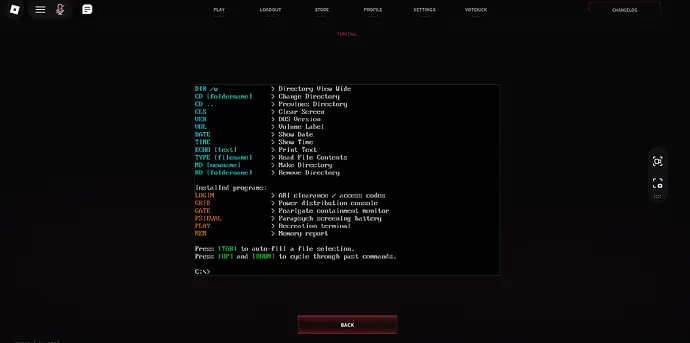
What the screenshot shows
The first post in the 2 September Devforum topic about the terminal font attached an image displayed at 690 by 343 pixels. I use that image as the picture of the menu, credited to the forum, not as proof of every button on it. The click path to open it is not written under the image. I will not say press T or press backtick. If the path shows up in a second post, it can be added with a date.
The font and the green-on-black look are why people assume a cheat console or a promo box. The codes page is the place that tracks rewards. As of this check the reward table is empty. Typing into a styled menu will not create a code the developer never posted.
Commands people hope are here
Searches for commands, admin, and terminal codes all land on this confusion. The official control list is six combat keys. None of them is a console command. The report tool mentioned in an older description is also not this screen, and that sentence has left the live text. I keep admin-command lists off this page entirely. Giving someone a fake command is worse than an empty section.
If you came from a video title that says terminal codes, read the codes page next, then come back only if you want the menu identified. The server browser is a third screen: a room picker, not this computer UI.
Questions
Where do I enter TTK Testing codes?
The public sources do not document a current redeem field. The codes page records the empty supported-code list.
Is the terminal a command line?
It is a styled menu in a Devforum screenshot. No command list is published with it.
Sources
- Devforum terminal-font topic and screenshot — checked 2026-11-18
- Roblox game page — checked 2026-11-18
- ttktesting.com codes — checked 2026-11-18
- ttk-testing.wiki codes — checked 2026-11-18
Listing label at last check: TTK Testing [NEW PISTOL]. Page updated 2026-11-18.